Sticker Shock: Why That QR Code on the Parking Meter Might Not Be the Council's
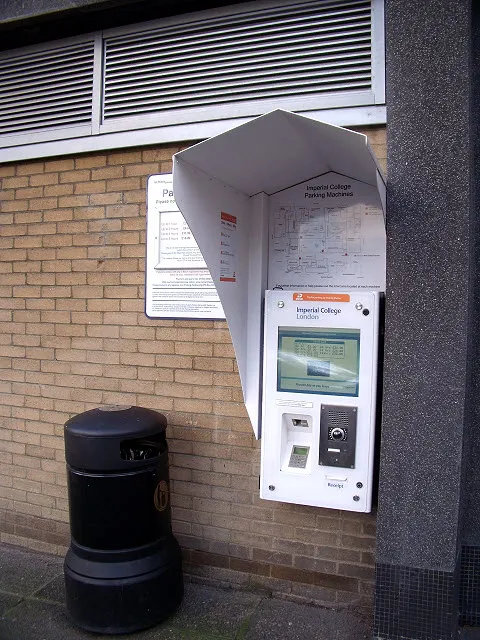
Photo: Stephen Craven , CC BY-SA 2.0, via Wikimedia Commons
Picture the scene. You pull into a council car park, late for something, and the ticket machine is not taking coins. There is a QR code stuck to the front with a note saying 'Scan to pay'. You scan it, tap in your card details, and drive off. A few days later, your bank asks whether you really meant to pay a subscription you have never heard of.
That is the basic shape of a QR code scam, sometimes called quishing. The sticker looks official. The payment page looks official. The only thing that is not official is the person who put it there.
What is quishing?
Quishing is phishing with a QR code. Instead of sending you a dodgy link by email, a scammer puts a QR code somewhere you already expect to see one: a parking meter, an electric vehicle charger, a council noticeboard, a bus stop or a car park sign. You scan it with your phone, and it opens a fake payment page designed to look like the real thing.
The scam is not new, but it has become more common as contactless and app-based payments have spread. Councils and parking operators have warned about fake stickers in various parts of the UK. EV chargers are another target, because drivers are often in a hurry and may not know the operator's official app.
Why car parks are a target
A car park is almost a perfect setting for this kind of scam. You are in a rush. The real payment machine may be broken, or you may not have the right change. The amount is small enough that you do not think twice. And you may not know which company runs the car park, so a QR code on a sign feels like a helpful shortcut.
The scammer only needs a few seconds to stick a label over the real code. The fake page can then collect card details, sign you up for a recurring payment, or push you to download an app that is not from the official app store.
The warning signs
No single sign proves a QR code is fake, but several together should make you stop.
- The sticker looks like a sticker. Check the edges. Is it sitting on top of the original code? Is it crooked, flimsy or peeling?
- The web address does not match. A council payment page should normally be on a .gov.uk domain, or on a payment provider the council names on its own website. If the address is a random string of letters, a shortened link or a misspelling, walk away.
- The page asks for too much. A genuine parking payment may ask for your registration number and card details. It should not ask for your PIN, your bank password or a photo of your driving licence.
- The amount looks wrong. If the page does not show the tariff clearly, or asks for a strange 'verification' fee, stop.
- It pushes you to download an app. If the app is not linked from the council's own site or the official app store, do not install it.
- There is pressure. Fake pages often use countdown timers or warnings that your car will be clamped. Real council pages can be annoying, but they rarely panic you into paying in 60 seconds.
Safer ways to pay
The simplest defence is not to scan QR codes in public places unless you have a good reason. If the machine takes contactless, use that. If it takes coins, use coins. If you need an app, go to the council's website and follow the link from there.
If you do scan a code, look at the address before you type anything. On most phones you can see the full URL or preview it. Check that it matches the council or the parking operator. If you are not sure, close the page and pay another way.
For EV chargers, use the operator's official app or the contactless reader on the charger. Do not rely on a QR sticker that has been added to the side of the unit. If the charger has a screen, check the instructions there.
If you have already scanned
Do not panic, but act quickly. Contact your bank or card provider, explain what happened and ask them to freeze the card or cancel the payment. Keep an eye on your statements for small test payments or recurring charges. If you entered a password, change it, especially if you use the same password elsewhere.
If you downloaded an app, remove it and run a security check on your phone. If you are worried about malware, speak to your bank or a reputable repair service.
How to report it
In the UK, suspected scams can be reported to Action Fraud online at actionfraud.police.uk or by phone on 0300 123 2040. Include the location, the time, a photo of the QR code and the web address it opened. Do not remove the sticker yourself unless a council officer asks you to; it may be useful evidence.
Tell the local council's parking team as well. They can remove the sticker and warn other drivers. If the code was on an EV charger, contact the charge point operator. You can also report to Trading Standards through Citizens Advice.
The slow way is the safe way
QR codes are useful, and most of them are genuine. But a sticker on a public machine is not a trusted source. Treat it like a link from a stranger: check where it goes before you hand over your card details. A few extra seconds in the car park is better than a fortnight of sorting out a fraudulent subscription.
If something feels off, trust that feeling. Pay at the machine, use the council's website, or call the number printed on the sign. The genuine route may be slower, but it will not ask you to confirm your bank password in a hurry.